SDLC on ServiceNow
End-to-end SDLC guide for building, testing, and releasing ServiceNow apps using the ServiceNow SDK, Git, ReleaseOps, and CI/CD pipelines.
← → TO NAVIGATE · Ashwin Patti, Shelby Cohen
Safe harbor statement
This presentation may contain "forward-looking" statements that are based on our beliefs and assumptions and on information currently available to us only as of the date of this presentation. Forward-looking statements involve known and unknown risks, uncertainties, and other factors that may cause actual results to differ materially from those expected or implied by the forward-looking statements. Further information on these and other factors that could cause or contribute to such differences include, but are not limited to, those discussed in the section titled "Risk Factors," set forth in our most recent Annual Report on Form 10-K and Quarterly Report on Form 10-Q and in our other Securities and Exchange Commission filings. We cannot guarantee that we will achieve the plans, intentions, or expectations disclosed in our forward-looking statements, and you should not place undue reliance on our forward-looking statements.
The information on new products, features, or functionality is intended to outline our general product direction and should not be relied upon in making a purchasing decision, is for informational purposes only, and shall not be incorporated into any contract, and is not a commitment, promise, or legal obligation to deliver any material, code, or functionality. The development, release, and timing of any features or functionality described for our products remains at our sole discretion. We undertake no obligation, and do not intend, to update the forward-looking statements.
Today, start to finish
👋 Welcome — 10:00 AM – 5:00 PM. By the end of today, you'll build, test, source-control, and release a real app end-to-end.
- 1️⃣Foundations & build-ready requirements
- 2️⃣Build & Test with Build Agent & ATF
- 3️⃣Lunch
- 4️⃣Off-instance development
- 5️⃣Source control
- 6️⃣ReleaseOps
- 7️⃣Push to production & choose-your-own adventure
What is an "app" in this model?
In scope
Global apps, non-global apps, and ITSM implementations built via "move and edit" — all under one model.
Out of scope
Customizing an out-of-the-box app you haven't taken "move" ownership of — that metadata has no persistent container of its own; it stays under ServiceNow's ownership, not yours.
Why it matters
One development model regardless of whether you're building net-new or customizing what's already there.
The prescribed stack
SDK
Build engine, compiles to deployable artifacts
Studio
IDE / prod code mode
Git
Branch, PR, merge
Sandbox
Isolated dev instance
Build Agent
AI-assisted authoring
ATF
Automated test framework
App Repo
Immutable artifact store
ReleaseOps
Assess, approve, release
Before Fluent: one representation, twice
What you edited
XML, via forms and clicks — hard to read, hard to diff, hard to review.
What the platform ran
The exact same XML — no compile step, no type checking, no diagnostics before install.
Fluent separates build time from runtime
Build time
TypeScript — humans read, write, and reason about it, with compile-time type checking and diagnostics
Runtime
Still what the platform executes underneath — you just don't touch that representation directly
That's shifting left in practice: mistakes get caught at build time, in your editor, before an install — not at runtime, after something's already broken.
SDK + Fluent = source-driven development
Fluent
A TypeScript DSL — .now.ts files define metadata with compile-time type checking and diagnostics, instead of clicking through forms.
export const MaintenanceRequest = Table({
  label: 'Maintenance Request',
  fields: { equipment: Reference('equipment') }
});
JS modules + React
Business logic as typed @servicenow/glide imports; UI Pages built in React, Svelte, Vue, or Preact.
THE INNER LOOP
THEN INSTALL AND TEST
Git is the authoritative source of truth
Git
Branching, pull requests, line-by-line review, three-way conflict resolution, precise point-in-time rollback.
Update sets
XML transport artifact only — not built for collaboration, branching, or human-readable diffs.
We'll go deeper on this contrast later in the Source Control module.
Get your source control ready
- 1️⃣Initialize your first Fluent application with nowSDK.
- 2️⃣Create a new git repo, push it, and connect your instance to it with a personal access token.
- 3️⃣Build and install it, and confirm it lands on your dev instance.
☕
9:55 – 10:10 · Back for build-ready requirements
Vague story vs. build-ready story
Vague
"As a facilities user, I want to request maintenance on equipment so it gets fixed."
Build-ready
Entities: Maintenance Request, Equipment
Roles: Requester (create/view own), Technician (view assigned, update status)
Given–When–Then: Given a Requester submits a request for active Equipment, When they submit, Then a Maintenance Request is created in "New" state and assigned per routing rule.
Your turn: rewrite it
- 1️⃣5 minutes — as a team, rewrite a vague story into one with entities, roles/access, and Given-When-Then.
- 2️⃣We present the requirements you'll actually build against this morning.
- 3️⃣Goal: finish the core requirements first — add extensions only if you finish early.
One instance, many developers, zero collisions
Dev instance
Shared, non-prod
Your sandbox
Feature branch lives here
Test instance
Separate from dev
Production
Separate from test
Allocate a sandbox before you start, create your feature branch inside it, decommission it when you're done.
Get your sandbox ready
- ✅Log in to your sandbox — same credentials from Exercise 01, just your sandbox URL instead of the base instance
- ✅Confirm your developer sandbox is allocated (from Exercise 01)
- ✅Create a feature branch off
main
What is Build Agent?
Conversational
Describe what you want in plain language; Build Agent proposes the entities, roles, and logic — no forms to click through.
Platform-native
It builds real Fluent metadata objects in your app's scope — not a disposable prototype you throw away later.
Full-loop
It generates the app and its ATF tests in the same session — which is what we'll build on next.
Build Agent in ServiceNow Studio
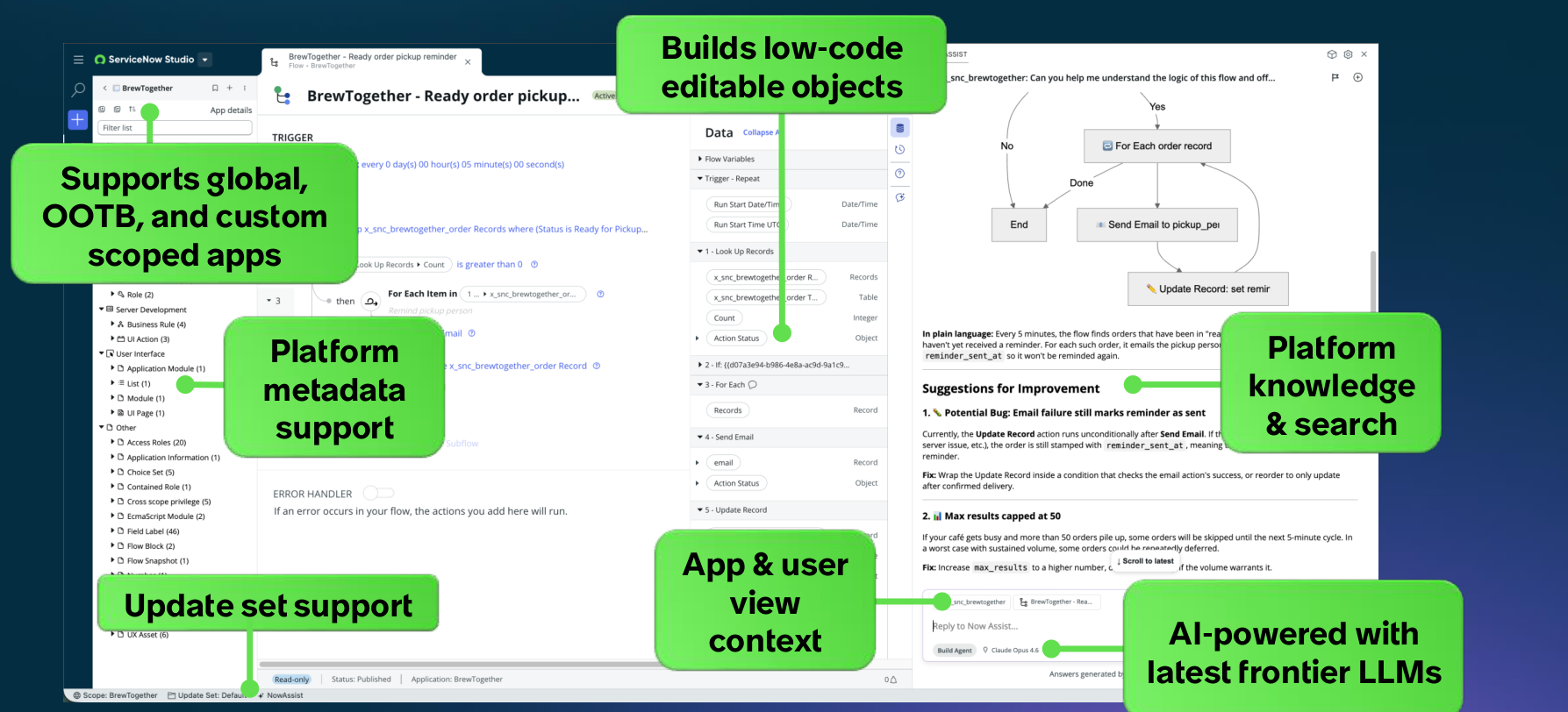
It reads your app's existing metadata, explains what a flow actually does in plain language, and proposes concrete fixes — grounded in your instance, not a generic answer.
Tests live in the dev loop, not bolted on
- 1️⃣Build Agent uses Test Agent to generate test cases from natural language.
- 2️⃣Run them, let Test Agent triage a failure, and fix it.
Build + test the maintenance app
- 👀First, see the finished app — what you're building toward.
- 💬Prompt Build Agent with the natural-language description from the whitepaper.
- 🧑🏫We'll float table-to-table throughout — flag us down anytime.
OPTIONAL · FOR ARCHITECTS
// the Fluent code Build Agent writes under the hood
export const MaintenanceRequest = Table({
  label: 'Maintenance Request',
  fields: { equipment: Reference('equipment') }
});
Questions?
11:30 – 12:00
🍽️
Back soon to re-anchor
Where we left off
Build
Done
Test
Done
Manage
PR, merge, publish
Release
ReleaseOps, deploy
Your app is built and tested. Next: source control and release.
Questions?
1:45 – 2:00
The same app, off the platform
- 💻Same Fluent project, opened in VS Code or your terminal instead of Studio.
- 🤖Claude Code (or Cursor/Codex) in place of Build Agent — same SDK underneath.
- 🔁
now-sdk build/now-sdk installwork identically, on- or off-platform.
Exercise: ship it with Git
- 1️⃣Off instance (GitHub): push branch → open PR → review → merge → publish pre-release to the App Repo.
- 2️⃣On instance: open the instance and pull the changes in SNS / the IDE using git.
📌 Prescriptive point
Git does branching, review, and line-by-line conflict resolution. Update sets cannot.
☕
3:00 – 3:15 · Back for ReleaseOps
The App Repository: your bridge to ReleaseOps
Source control
Merged to main — many versions at once, across sandboxes
App Repository
A Studio publish makes the app installable on every instance in your company
Update Set
Auto-generated by the publish — the actual deployment payload
ReleaseOps doesn't connect to source control directly — it's this auto-generated Update Set that gets promoted into a Deployment Request next.
ReleaseOps: Two objects, one pipeline
Deployment Request
The payload container. Promote an Update Set into one, then mark it "Ready to Assess" — the assessment playbook (Instance Scan → Move to Test → Run ATF) runs against it.
Release
The record that moves a cleared Deployment Request to production — On Demand (immediately) or Scheduled (batched at a datetime). Lives on the ReleaseOps controller environment, typically production.
Two paths get you here: promote an Update Set into a Deployment Request (this lab), or trigger it from Git via the CI/CD REST APIs with an approval gate (see choose-your-own-adventure).
Why you need three instances
Dev
Where you build, and where Instance Scan runs
Test / Staging
The assessment target — a configurable label, not literally "test"
Production
The separate, final destination
Assessment already moves the payload from dev to your test/staging target. If that's also your final destination, release has nowhere new to push — you need a separate instance for each stage.
Freeze date
The cutoff for reaching Ready for Deployment. Miss it, and the Deployment Request is marked deferred — not blocked, and it can still ride a later release.
Release date
When the batch push to production actually fires, for every non-deferred Deployment Request that's ready.
The quality-control model
Instance Scan
Static policy check, on the dev instance
Move to test
Assessment begins
Run ATF
Functional coverage
Ready for Deploy
Cleared for release
LAB: CREATE A DEPLOYMENT REQUEST, MARK "READY TO ASSESS," WATCH IT RUN
Retest
Rerun the assessment as-is.
Need Code Change
Assessment is invalidated — the Deployment Request returns to Draft and needs a new payload.
Sign Off
Manual approval to proceed.
Questions?
3:45 – 4:00
Promote, deploy, and roll back if needed
- 1️⃣Promote the Deployment Request to a release.
- 2️⃣Push to "production."
- 3️⃣Roll back within the fixed window — only when installed from the Application Repository.
Pick a track, go deep
Fluent deep dive
More metadata types, transform/sync from UI builders
Testing deep dive
Test Agent triage, Cloud Runner, regression suites
CI/CD APIs
now-sdk cicd, Git-triggered pipelines, approval gates
MCP integrations
Connect Figma/Miro via Connect Hub, build straight from the spec
Custom rules
Rules that change language/terminology in Build Agent output
ReleaseOps
Deployment Request, assessment playbook, Ready for Deploy
Explore whichever track interests you most — we're here for questions. Head to the exercise for ideas to get started.
One picture, your app traced across it
Plan
Build
Test
Manage
Release
QUESTIONS? PING Ashwin Patti, Shelby Cohen.
Warp Speed — vibe coding, on the platform
Log in
Authenticates against home base
Prompt Build Agent
Builds in an isolated runtime
Live URL
Dev and prod at once
🙏
Full SDLC guide, reference, and troubleshooting:
servicenow.github.io/sdk/guides/sdlc-guide
Build Agent — Autonomous Engineering
- 📋Give it requirements — a prompt, a file upload (e.g. a CSV of user stories), or an MCP-connected tool like Jira — and Build Agent interviews you to resolve anything ambiguous, then produces a full implementation plan: work items in Agile-story format, sequenced by a dependency graph.
- ✅You review and approve every work item first — nothing builds until you sign off on the plan.
- ⚡Once approved, Build Agent runs a background agent per work item, building all of them in parallel — each one generates and runs its own ATF tests, with automatic retries and root-cause analysis on failures — then bundles everything into one Update Set when the plan completes.
- 🔑Requires the "Autonomous Engineer" app from the ServiceNow Store — check entitlements before promising this to a customer.
- 🖥️If accessible, show the new Studio UI live here instead of a screenshot — permissions-dependent, confirm access before the session.
Test Agent in Autonomous Engineering
- 🤖No separate prompt needed: Test Agent reads each work item's stories and acceptance criteria straight from the plan and generates ATF tests automatically as execution begins.
- 🔁Same auto-heal loop as today's flow — RCA on failure, safe fixes auto-applied or surfaced for your review — just running per work item, in parallel, instead of one prompt at a time.
- 🆕What's new here: UI tests are now generated too, not just functional ones — multi-step, browser-level flows — plus list and related-list test steps (filtering, related-list visibility).
- 💬Example prompt (works outside AutoEng too):
Generate ATF tests for all the feature permutations on the app we built.Then:Execute all ATF tests.
Build Agent + MCP
Connect Hub
Admin configures the Figma/Miro app
AI Control Tower
Admin approves it
Your settings
Enable MCP servers (MCP tab)
Build Agent
Reads specs directly from the tool
One-time admin setup (Connect Hub + AI Control Tower approval), then any developer turns it on for themselves in their own Build Agent settings.
Custom rules — changing language
- 📝TODO: what a "custom rule" actually is in this context (terminology/localization? tone/style guidance for Build Agent output?) — confirm before presenting.
- 📝TODO: where it's configured, and whether it's app-scoped or instance-wide.
- 📝TODO: example prompt or before/after, if available.
BONUS SLIDE — PENDING/ROADMAP CONTENT PER LEGAL (SLIDE 2). PRESENTER TO FILL IN BEFORE SESSION.